
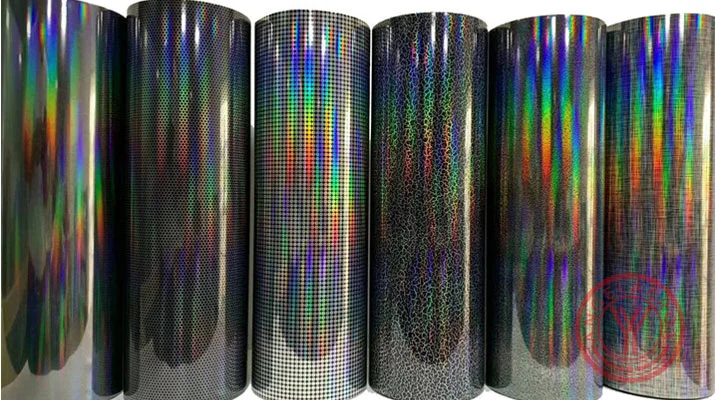
What is a Hologram Heat Transfer Vinyl
Hologram Heat Transfer Vinyl (often called Hologram HTV) is a specialty heat transfer film designed to create iridescent, multi-dimensional, and light-reflective visual effects on fabrics. Unlike standard matte or glossy HTV, hologram vinyl shifts colors when viewed from different angles, producing a dynamic “rainbow-like” shimmer that resembles holographic foil or prism effects.
At its core, hologram HTV is a PU, TPU or PET-based film with a special optical layer that refracts light. When heat-pressed onto fabric, it permanently bonds with the textile while maintaining its reflective holographic surface.
How Does Hologram Heat Transfer Vinyl Work?
Hologram heat transfer vinyl works by using heat and pressure to bond a shiny, multi-layer film onto fabric, creating a reflective color-shift effect. The design is cut, weeded, pressed onto the garment, and then the clear carrier sheet is peeled away after cooling.
The structure typically includes:
- Carrier layer (PET film): Holds the design before pressing
- Holographic optical layer: Creates rainbow reflection and light diffraction
- Adhesive heat-activated layer: Bonds vinyl to fabric
- Protective top coating: Maintains shine and durability
The Heat Transfer Process
- The vinyl is cut into a design using a cutting machine (Cricut, Silhouette, etc.)
- Excess material is removed through weeding
- The design is placed on the garment
- Heat press applies controlled temperature and pressure
- After peeling, the holographic effect becomes fully visible
The result is a durable, flexible, and highly reflective design embedded into the textile.
Key Features of Hologram HTV
Hologram HTV (holographic heat transfer vinyl) offers a reflective, color-shifting finish with durability for garment decoration and is used when you want a high-impact, light-reactive decorative effect.
- Shiny, prism-like finish with a rainbow effect
- Color-shifting appearance that changes as the wearer moves or lighting changes
- Creates depth and dimension through reflective optical effects
- Can mimic the look of rhinestones without extra labor
- Available in multiple colors and finishes, including translucent pearl options
- Made from polyester-based material and commonly CPSIA certified
- Works on cotton, polyester, cotton/poly blends, and some leather types depending on brand
- Usually has a clear pressure-sensitive carrier sheet for easy cutting and placement
Types of Hologram Heat Transfer Vinyl
Hologram HTV comes in different styles such as rainbow, pearl, sparkle, metallic, and clear, each offering a unique light-reflective and color-shifting effect.
- Rainbow Hologram: A bright rainbow shine that changes color in the light.
- Pearl Hologram: A soft pearly glow with blue, pink, or purple tones.
- Sparkle Hologram: A glitter-like reflective finish with strong light sparkle.
- Metallic Hologram: A chrome-like shine with silver, gold, or metallic reflection.
- Clear Hologram: A transparent prism effect with subtle rainbow reflections.
- Faux Rhinestone Hologram: A 3D sparkling effect that mimics rhinestones.
Common Applications of Hologram HTV
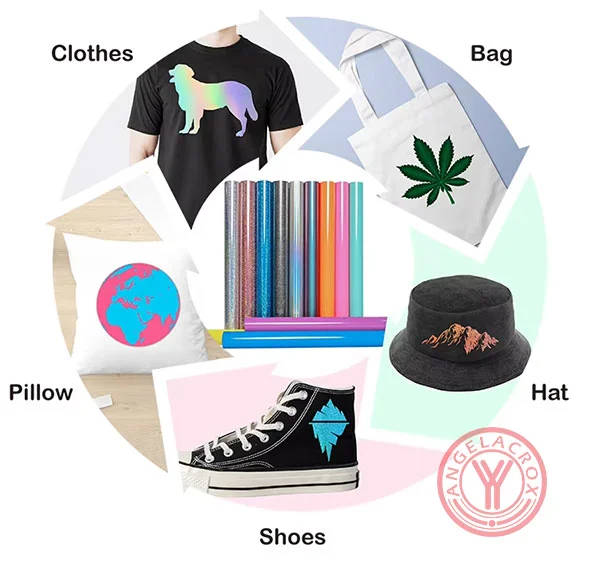
Hologram HTV is widely used for creative and decorative apparel designs where high visual impact is required.
- T-shirts and hoodies
- Team uniforms, cheer and dancewear
- Tote bags, hats, and backpacks
- Logos, names, and custom lettering
- Fashion details and statement graphics
- Faux rhinestone-style “bling” designs
- Children’s apparel and promotional items
Hologram HTV vs Other Heat Transfer Vinyls
Here is a quick comparison between Hologram HTV and other common types of heat transfer vinyl:
| Type | Look | Main Feature | Typical Use |
|---|---|---|---|
| Standard HTV | Smooth, matte | Clean and simple finish | Logos, text, basic designs |
| Glitter HTV | Sparkly, textured | Bright reflective shine | Cheer wear, party designs |
| Pearlescent HTV | Soft pearl shine | Elegant subtle color shift | Fashion graphics |
| Flock HTV | Soft, fuzzy texture | Suede-like finish | Retro or premium designs |
| Glow-in-the-dark HTV | Visible in day, glows at night | Light-emitting effect | Costumes, novelty items |
| Hologram HTV | Prism-like, color-changing shine | Strong 3D optical effect | Fashion, dancewear, statement graphics |
How to Use Hologram Heat Transfer Vinyl?
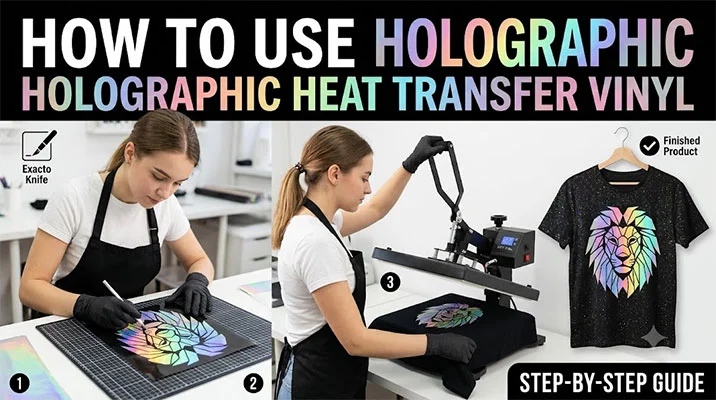
Using hologram heat transfer vinyl is simple once you understand the correct workflow: design, mirror, cut, weed, press, and peel.
What You Need
Before starting, prepare the following tools and materials:
- Hologram Heat Transfer Vinyl (HTV)
- Cutting machine (Cricut, Silhouette, Graphtec, etc.)
- Heat press machine or household iron
- Weeding tool
- Heat-resistant tape (optional but helpful)
- Teflon sheet or parchment paper
- Fabric (cotton, polyester, or blends)
1. Preparing and Cutting the Design
- Mirror your image: Holographic HTV must be cut in reverse. Always mirror your design in your cutting software before cutting.
- Placement: Place the shiny (film) side down on the cutting mat, with the adhesive side facing up.
- Cut settings: Use a deeper blade and higher pressure than standard vinyl. On Cricut, use “Iron-on” or “Glitter Iron-on” settings as a starting point.
- Weeding: Remove excess vinyl slowly using a weeding tool, especially for small details.
2. Pressing the Vinyl
- Preheat: Set heat press to about 160°C (320°F). Preheat garment for 2–3 seconds to remove moisture and wrinkles.
- Apply heat: Place the design on the fabric and cover with a Teflon sheet or parchment paper. Press with firm pressure for 15–20 seconds.
- Layering tip: If layering, keep holographic HTV as the top layer and use short press time (3–5 seconds) for base layers.
3. Peeling and Care
- Cold peel: Wait until the design is completely cool before removing the carrier sheet.
- Post-press: If edges lift, press again for 5–10 seconds with protective sheet.
- Washing: Wait 24 hours before washing. Wash inside-out in cold or warm water. Avoid harsh detergents and bleach.
Holographic Heat Transfer Vinyl Cut Settings
Holographic HTV cuts best with the design mirrored, shiny side down, and a test cut recommended before full production. Start with medium speed, moderate blade depth, and one pass, then adjust until the vinyl cuts cleanly without cutting through the carrier sheet.
- Cricut: Use “Custom” material and select Holographic Vinyl or Foil Iron-On. Set pressure to “More” if weeding is difficult.
- Silhouette Cameo: Blade depth 4–5, force 25–30, speed 5–8. Use a 45° or 60° blade for best results. If needed, use double cut for clean weeding.
- Brother ScanNCut: Blade depth 3, speed 3.
Tip: If details are not weeding cleanly, slightly increase blade depth or pressure, but avoid cutting through the carrier sheet.
Ready to create your own eye-catching designs? Explore our Holographic HTV Vinyl product page for more options, or contact us today to get expert support and find the right vinyl for your project.