
DTF (Direct-to-Film) transfer films are categorized by their peeling method: hot-peel, warm-peel, cold-peel, or "instant-peel" (requiring no cooling time). While all these types can produce vibrant designs on apparel, variations in raw materials, coatings, and manufacturing processes among different suppliers lead to differences in wash durability and color vibrancy. The choice of DTF film depends on factors such as your daily production volume, the level of detail in your designs, the texture of the fabric, and your specific quality requirements.
The timing for peeling the film is not determined solely by the DTF pigment ink or the hot-melt adhesive powder; rather, it depends on the specialized design of the microscopic release coating on the surface of the PET transfer film. Factors such as the chemical composition of the coating, the thickness of the film (typically 75–100 microns), whether the film features a single-sided or double-sided matte finish, and the temperature of the heat press all influence how cleanly the design separates from the carrier film.
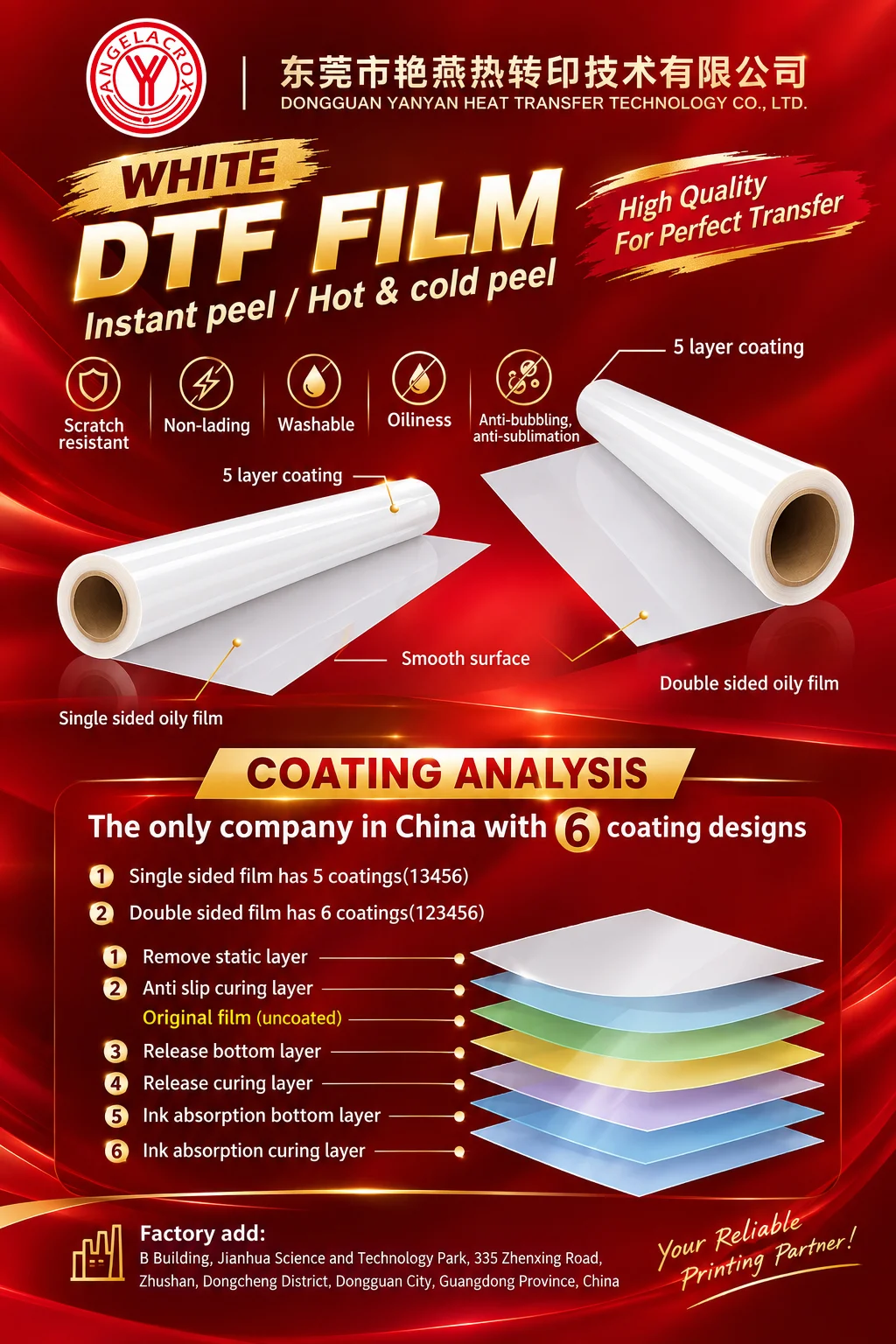
For high-volume commercial print shops, hot-peel or instant-peel films can significantly shorten the heat-pressing cycle. However, these require greater operational precision; improper technique can sometimes result in the design failing to peel off cleanly. Conversely, for designs with extremely fine lines, textured fabrics, or projects requiring specific tactile effects, cold-peel or warm-peel films offer a higher success rate. Yanyan Heat Transfer Technology Co., Ltd. has developed a six-layer coated DTF film that effectively addresses these challenges, ensuring consistent, high-quality output regardless of whether a cold, warm, or hot-peel method is used.
Why Peel Timing and Coating Structure Matter in DTF Printing
In the Direct-to-Film (DTF) process, the PET film must perform two distinct functions: first, it must reliably hold the CMYK and white pigment inks during printing, powder application, and curing, ensuring the ink does not bleed or bubble; second, under heat and pressure, it must allow the cured ink layer to be transferred onto the garment completely and cleanly. (For a comprehensive overview of this process, please refer to our guide: "What Is DTF Transfer Film?")
If an operator removes a "cold-peel" film while the DTF hot-melt powder is still in a molten state, fine dots and tiny text may be lifted away along with the film, resulting in loss of detail. Conversely, if a "hot-peel" film is left to cool completely before removal, the heat-release layer may re-solidify and bond with the white ink layer, causing the transferred design to tear or resulting in ragged, uneven edges.
Important Note: High-speed film removal requires consistent, multi-layered coating quality. YanYan’s DTF transfer film features a 6-layer coating structure applied to a 75μm high-temperature-resistant PET base. The front side integrates an ink-absorptive layer, a matte layer, and a precision-engineered release layer, while the back is treated to be anti-blocking (preventing sheets from sticking together) and anti-static. This design ensures smooth, stable feeding through the printer, a clean surface free of residual powder, and resistance to warping or deformation during the transfer and peeling process. Currently, this specific technology is exclusive to YanYan.
DTF Film Factors That Affect Transfer Quality
-
Release Coating Chemistry: Formulated to enable peeling at various stages—instant (1–2 seconds), hot (2–5 seconds), warm (5–10 seconds), or cold (45–45 seconds).
Single-Sided vs. Double-Sided Coating: A matte coating on both sides helps reduce static electricity buildup and prevents roller slippage in industrial roll-to-roll printers.
Film Thickness: A 75μm (within a 75–100 micron range) PET substrate ensures both effective thermal conductivity inside the curing oven and consistent dimensional stability.
Fabric Weave and Finish: Smooth-surfaced, ring-spun cotton fabrics typically allow for faster transfer speeds compared to coarse canvas, ribbed knits, nylon, or specially treated synthetic fabrics.
Design Geometry: Large, solid-colored areas are generally easy to peel while hot; conversely, fine details—such as 1-point-sized dots—or designs with mottled/textured edges require stronger initial adhesion to the fabric fibers.
How Do Instant Peel, Hot Peel, Warm Peel, and Cold Peel DTF Films Compare?
All four peel types use a coated PET carrier compatible with standard DTF pigment inks (CMYK + White) and hot-melt adhesive powder, and all four can achieve over 50 home washes and 10+ American standard washing tests when properly pressed. The primary differences lie in press-room speed, operating tolerance, and surface finish.
In high-volume apparel shops, instant peel and hot peel films maximize hourly output per heat press. Warm peel films offer a forgiving middle ground for multi-operator teams, while cold peel films remain essential for intricate detail work and specialty effect transfers.
| DTF Film Peel Type | Peel Timing After Opening Press | Typical Advantages | Important Limitations and Checks |
|---|---|---|---|
| Instant Peel DTF Film | Peel immediately (0–1 second) as soon as the upper platen opens. | Delivers maximum production throughput with zero cooling wait time; leaves a soft, breathable matte finish well suited for bulk T-shirt and POD fulfillment. | Requires even platen pressure and accurate temperature (160–165°C). Test ultra-fine floating halftone dots before running unbordered designs. |
| Hot Peel DTF Film | Peel within 1–3 seconds while the carrier and garment are still hot. | Eliminates cooling racks, speeds up commercial press cycles by 40%–50%, and produces a smooth matte hand feel across cotton, polyester, and blends. | Do not allow pure hot peel film to cool completely before peeling, as the thermal release wax may re-harden and increase peel resistance. |
| Warm Peel DTF Film | Wait 5–10 seconds for brief heat dissipation, then peel while warm. | Provides a wide, forgiving peeling window that reduces operator error across busy shops handling mixed garment styles and graphic sizes. | Slightly slower per garment than instant peel, but offers stronger edge retention on medium-detail typography and mixed fabrics. |
| Cold Peel DTF Film | Allow the transfer to cool to room temperature (20–45 seconds) before peeling. | Locks down micro-text, fine halftones, and heavy ink deposits completely before carrier removal; ideal for tough fabrics and specialty effect films. | Requires a two-stage workflow (press, set aside to cool, then peel and repress) to maintain high hourly output in bulk production. |
When running specialty media—such as Glitter DTF Film, Reflective DTF Film, Gold/Silver Metallic, Foil, Holographic, Chameleon, Glow-in-the-Dark, or 3D Embroidery UV DTF Stickers—always follow the specific peel method specified for that effect layer rather than assuming a universal hot peel setting. If you are running glow-in-the-dark stock, the glow in the dark DTF film guide sets out its own peel and curing procedure.
Which DTF Film Configuration Is Best for Your Production Needs?
Beyond peel timing, selecting the right DTF film involves matching the roll or sheet size, coating side (single vs. double), and surface finish (matte vs. glossy) to your printer hardware and garment line. Explore our complete DTF Film catalog for standard and specialty configurations.
| Production Scenario or Printer Setup | Recommended DTF Film Type | Recommended Size & Coating | Key Production Check |
|---|---|---|---|
| High-speed commercial roll-to-roll printing (Epson i3200 / 4720 / Mimaki TxF) | Instant Peel or Hot Peel DTF Film | 60cm × 100m/roll; Double-Sided Matte (6-layer anti-static) | Verify smooth media feeding and clean powder shake-off through your automatic shaker-dryer unit. |
| Mid-volume custom apparel shops (Epson XP600 / L1800 / Roland BN) | Warm Peel or Hot Peel DTF Film | 30cm, 33cm, or 60cm rolls; Single or Double Print Side | Standardize operator peel timing (e.g., 2s for hot peel or 8s for warm peel) across all heat press stations. |
| Small-batch logos, sample runs, and desktop sheet printers | Warm Peel or Cold Peel DTF Film | A3 (297 × 420mm) or A4 (210 × 297mm) cut sheets | Confirm the printable matte side before loading sheets into the printer tray (use light or touch test). |
| Intricate halftone artwork, nylon sportswear, denim, or leather | Cold Peel DTF Film | 60cm × 100m/roll, A3, or A4; 75μm Matte PET | Allow full cooling so the TPU adhesive crystallizes around coarse or treated fibers before peeling. |
| Fashion branding requiring special visual effects | Glitter, Reflective, Metallic Gold/Silver, Foil, Holographic, Chameleon, or Glow-in-the-Dark DTF Film | Roll or Sheet format matched to specialty series | Test wash resistance and surface gloss after the second finishing press. |
If you are comparing Direct-to-Film against dye sublimation for polyester sportswear, you can also review our technical comparison: What Is the Difference Between DTF and Sublimation?
Heat Press Settings for DTF Transfer Film
To achieve a soft hand feel and pass 50+ home wash cycles, YanYan recommends a two-step heat transfer process (first transfer press followed by a finishing press). While general application can run between 150°C–170°C for 10–15 seconds, our optimized two-step commercial benchmark is outlined below.
Always adjust dwell time and temperature when transitioning from 100% cotton to heat-sensitive polyester, nylon, spandex, or silk/rayon blends.
| Control Point | Recommended Practice | Why It Matters |
|---|---|---|
| First transfer press | Press at 160°C–165°C (320°F–329°F) for 6–8 seconds (or 150°C–170°C for 10–15 seconds depending on fabric thickness). | Melts the cured TPU hot-melt powder evenly into the garment fibers without over-baking the ink layer. |
| Platen pressure | Use medium to firm even pressure across the entire design area; use a pressing pillow if seams or collars interfere. | Consistent pressure ensures fine edges anchor to the fabric, which is especially critical for instant and hot peel films. |
| Peeling stage | Peel immediately (instant/hot), after 5–10s (warm), or after cooling (cold) with a low, steady pull angle. | Peeling at the film's engineered temperature window prevents ink stretching, edge lifting, or carrier residue. |
| Second finishing press | Repress with a protective sheet at up to 180°C (356°F) for 15–30 seconds (reduce temperature to 150°C–160°C for heat-sensitive synthetics). | Locks the ink into the fabric weave, eliminates plastic sheen, softens hand feel, and maximizes 50+ wash durability. |
| Powder & curing match | Ensure white DTF hot-melt powder is fully melted (orange-peel smooth look) before pressing onto the garment. | Under-cured powder causes poor wash fastness and edge lifting regardless of whether hot or cold peel film is used. |
Production tip: Always verify that your team prints on the coated matte side of the DTF film. Hold the film under shop lighting (the printable side is less reflective), feel for the slightly rougher coating texture, or apply a tiny drop of water (the printable coating absorbs moisture rather than repelling it).
How to Test DTF Film Before Approving Bulk Production
When evaluating a new batch of hot peel, warm peel, or cold peel DTF film, run a standardized shop test using your actual RIP profile, white ink density, hot-melt powder, and target garments.
Recommended DTF Film Production Test Procedure
- Confirm the printable coated side of the film and load the roll (60cm, 30cm, 33cm) or sheet (A3, A4) into your DTF printer.
- Print a test target containing solid color blocks, fine 1pt–2pt text, gradients, and a uniform white ink underbase.
- Inspect the wet print for even color bearing, sharp edge definition, and zero ink beading or pinholes.
- Apply white DTF hot-melt adhesive powder and shake off excess powder; verify that the anti-static coating sheds powder cleanly with zero background sticking.
- Cure the powdered film in your oven or shaker-dryer and check that the 75μm PET film remains flat without warping, curling, or coating blisters.
- Press the transfer onto the target garment (160°C–165°C for 6–8 seconds) and peel according to the film's rated method (instant, hot, warm, or cold).
- Complete the second finishing press, allow the garment to rest for 24 hours, and conduct stretch and wash testing (evaluating against 50+ home wash standards).
- Record the RIP white-ink percentage, oven curing temperature, press temperature, time, and peel method for your production SOP.
To support fast local testing and restocking, YanYan maintains local warehouses in the USA, Brazil, Peru, South Africa, and Indonesia, alongside factory-direct wholesale shipping (MOQ from 1 roll, free sample sheets available).
Common DTF Film Peeling Problems and How to Fix Them
1. Fine Letters or Halftone Dots Lift With the Film During Peeling
If small details stay on the PET film instead of the shirt, either the film was peeled at the wrong temperature (such as hot-peeling a cold-peel film), platen pressure was too light, or the hot-melt powder was under-cured. Verify the film's peel rating, increase press pressure to medium-firm, and check platen temperature uniformity.
2. White Powder Sticks to Unprinted Areas of the Film
Powder residue around the graphic is typically caused by static electricity, excessive ambient humidity, or ink misting. Using YanYan’s 6-layer double-sided matte anti-static DTF film and maintaining relative humidity between 45% and 60% in the print room prevents static powder clinging.
3. The Coating Blisters or the Film Warps Inside the Curing Oven
Blistering and curling occur when the PET substrate is too thin (<65μm) or when oven curing temperatures are set excessively high for too long. Use a dimensionally stable 75μm–100μm heat-resistant PET film and calibrate your curing oven so the powder melts into a smooth orange-peel texture without overheating the carrier.
4. The Transferred Print Feels Stiff or Glossy After Peeling
A heavy, plastic-like feel usually means white ink density is set too high in the RIP software, coarse powder was applied too thickly, or the second finishing press was skipped. Reduce white underbase ink to the optimal 60%–75% range, shake excess powder thoroughly, and complete a 15–30 second finishing press with a matte cover sheet.
Frequently Asked Questions
What is the main difference between hot peel and cold peel DTF film?
Hot peel DTF film has a fast-release thermal coating that allows you to peel the carrier within 1–3 seconds after opening the heat press, maximizing production speed. Cold peel DTF film must cool for 20–45 seconds before peeling so the adhesive solidifies completely, offering extra security for ultra-fine details, textured fabrics, and specialty effect films.
What happens if you hot peel a cold peel DTF film?
Peeling a cold peel film while it is still hot will pull molten adhesive and ink away from the fabric, stretching the design or leaving incomplete transfers. Always allow cold peel film to cool to room temperature before removing the carrier.
Does hot peel DTF film last as long in the wash as cold peel film?
Yes. When paired with quality DTF ink and hot-melt powder and finished with a second heat press, YanYan’s instant, hot, warm, and cold peel DTF films all withstand over 50 home washes and have passed American standard washing tests more than 10 times.
Which DTF printers are compatible with YanYan’s DTF transfer film?
Our 75μm single-side and double-side coated DTF films work with all desktop and industrial DTF inkjet printers, including Epson L1800, Epson XP600, Epson i3200, Epson 4720, Mimaki TxF series, and Roland VersaSTUDIO BN series.
Can you reuse DTF film after heat pressing?
No. DTF transfer film is a single-use carrier. Once the ink-receptive and release coatings have gone through printing, powder curing, and heat pressing, the release layer is expended and cannot accept ink a second time.
What sizes and MOQs are available for wholesale DTF film?
Standard sizes include 60cm × 100m rolls, 30cm and 33cm rolls, and A3/A4 sheets (with custom widths available). Our wholesale MOQ starts from 1 roll, free samples are available for testing, and fast delivery is supported from our factory and local warehouses in the USA, Brazil, Peru, South Africa, and Indonesia.
Key Takeaway
Choosing between instant peel, hot peel, warm peel, and cold peel DTF film is a strategic balance between press-room speed and application versatility. Instant and hot peel films dramatically increase daily garment output for bulk orders, warm peel offers a forgiving all-around workflow, and cold peel provides maximum control for micro-details and specialty finishes.
Regardless of peel speed, consistent printing and 50+ wash durability depend on a stable 6-layer anti-static coating, a warp-resistant 75μm PET core, and properly matched DTF inks and hot-melt powder.
If you are optimizing your shop's transfer workflow, explore our full range of DTF Film rolls, sheets, and specialty effects, or browse our complete Heat Transfer Material catalog for one-stop wholesale supply.
Always validate your printer profile, curing temperature, and peel timing with a sample press on the actual garment before starting bulk production.
Editorial note: This guide provides practical general information. Always follow the latest technical data sheet and care instructions for the exact DTF film, ink, adhesive powder, and garment being used.