
YanYan Glitter HTV Settings
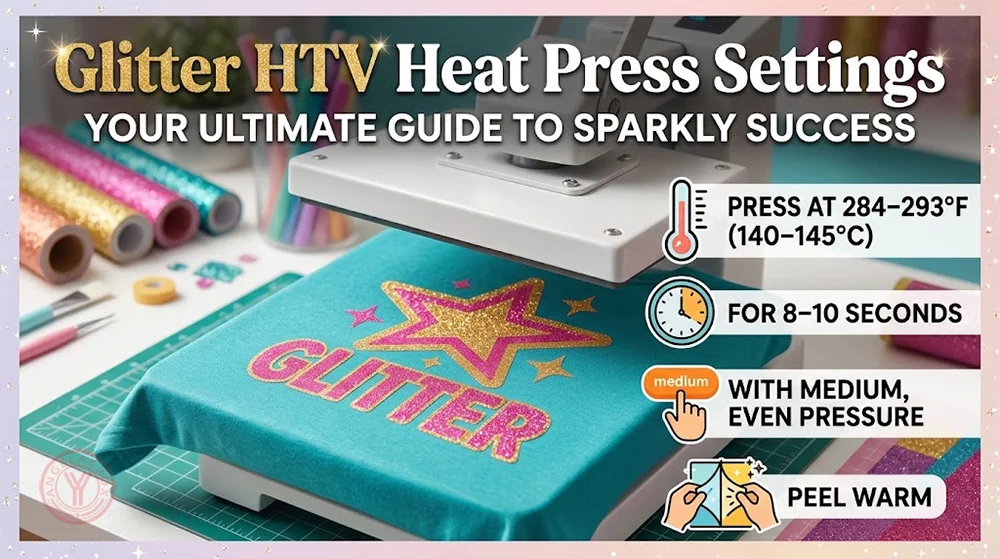
For YanYan Glitter Heat Transfer Vinyl, press at 284–293°F (140–145°C) for 8–10 seconds with medium, even pressure. Peel the carrier while it is still warm.
These settings apply to YanYan Glitter HTV. Always test the exact garment before production, especially when decorating polyester, sublimated fabrics, coated textiles, or stretch blends.
Glitter HTV is thicker and more textured than standard smooth heat transfer vinyl. A clean transfer depends on more than the temperature shown on the press: the adhesive needs even heat, the garment needs a flat contact area, and the carrier must be peeled at the correct stage.
Quick Heat Press Settings
Use the settings below as the standard application guide for YanYan Glitter HTV.
| Setting | YanYan Recommendation | Practical Note |
|---|---|---|
| Temperature | 284–293°F (140–145°C) | Check platen temperature if adhesion changes from one area of the press to another. |
| Press Time | 8–10 seconds | Do not extend the press time without a test. Extra heat can affect garment appearance and glitter texture. |
| Pressure | Medium, even pressure | The 3–5 kg reference is a starting point. Actual pressure varies by press structure and platen size. |
| Peel Method | Warm peel | Let the carrier cool briefly, then peel while it is warm rather than fully cold. |
| Pre-press | 2–5 seconds | Remove surface moisture and wrinkles before positioning the transfer. |
| Wash Wait Time | At least 24 hours | Turn garments inside out for washing and follow the garment-care instructions. |
Before bulk production: Make one test transfer on the final garment, not only on a scrap fabric. Check edge adhesion after the warm peel, then keep the sample for washing and inspection.
Why Glitter HTV Settings Can Vary
Glitter HTV is not made to one universal specification. Adhesive activation temperature, glitter-layer thickness, carrier construction, and fabric compatibility can differ from one film to another. Those differences affect the required heat, press time, pressure, and peel method.
YanYan Glitter HTV uses the standard setting shown above. If you are using another glitter film, follow the instructions supplied with that product rather than copying these settings.
How to Apply YanYan Glitter HTV
- Mirror the design before cutting. Place the vinyl carrier-side down on the cutting mat. Reverse all text and directional artwork before cutting.
- Run a small test cut. Glitter HTV is usually thicker than smooth HTV. Test blade depth and force before cutting detailed artwork or a full production roll.
- Weed the excess vinyl. Remove the unwanted material while leaving the finished design on the carrier. Check small letters, sharp corners, and fine details before pressing.
- Pre-press the garment for 2–5 seconds. This removes moisture and wrinkles and creates a flatter print area. It is particularly useful for cotton, fleece, canvas, and garments stored in humid conditions.
- Position the transfer on a flat area. Keep the design clear of thick seams, zippers, pockets, buttons, drawstrings, and ribbed sections. Use a pressing pillow or suitable platen setup where needed.
- Press at 284–293°F (140–145°C) for 8–10 seconds. Use medium, even pressure. The 3–5 kg pressure reference may need adjustment depending on your machine and platen size.
- Peel the carrier while warm. Allow a short cooling period, then remove the carrier while it is still warm. If an edge starts to lift, place the carrier back down and repress before peeling again.
Using YanYan Glitter HTV on Different Fabrics
YanYan Glitter HTV is designed for common apparel-decoration applications, including cotton, polyester, cotton/poly blends, Lycra, and Spandex. Even with a lower application temperature, test the final garment before a full run.
| Fabric | Application Guidance | What to Test |
|---|---|---|
| 100% Cotton | Use the standard YanYan setting. | Check full edge adhesion after the warm peel. |
| Cotton/Poly Blend | Use the standard setting and pre-press first. | Check for shine marks and uneven pressure on thicker garments. |
| Polyester | The lower application temperature helps reduce heat exposure. | Test the actual garment for press marks and dye migration before bulk production. |
| Sublimated Polyester | Use a controlled test process before approving production. | Inspect the sample again after 24–48 hours and after washing. |
| Lycra / Spandex | Use medium pressure and avoid over-pressing. | Check edge adhesion and stretch recovery after the fabric is extended. |
| Canvas Bags | Use the standard setting on a flat, supported pressing surface. | Check pressure near seams, handles, and thick stitched areas. |
Dark polyester and sublimated garments need extra attention. Dye migration may not be visible when the garment leaves the press. Keep a test piece aside, inspect it again after 24–48 hours, and include a wash test before approving repeat production.
Troubleshooting YanYan Glitter HTV
When a transfer does not perform as expected, change one variable at a time. Raising the temperature first is not always the answer.
| Problem | Likely Cause | Recommended Action |
|---|---|---|
| Edges lift during warm peel | Uneven pressure, incomplete heat transfer, or peeling too early | Lay the carrier back down and repress at the standard setting (see table above). |
| Only part of the design adheres | The design crosses a seam, zipper, pocket, or thick garment area | Improve platen contact with a pressing pillow, pad, or adjusted garment placement. |
| Glitter surface looks less textured | Over-pressing or unnecessary repeat pressing | Do not increase time or temperature without testing. Use only the minimum repress needed to restore adhesion. |
| Polyester changes color later | Dye migration or fabric sensitivity | Keep a sample for 24–48 hours and wash test it. Confirm garment suitability before mass production. |
| Transfer lifts after washing | Incomplete bonding, early washing, or unsuitable care conditions | Wait at least 24 hours before washing. Check the original press conditions and repeat a wash test on the final garment. |
Production Test Checklist
For repeat decoration, wholesale orders, or a new garment source, a production test is worth the time. A transfer that looks good immediately after pressing is only the first check.
- Verify actual platen temperature, especially if the heat press has not been calibrated recently.
- Check pressure across the full design area, not only in the center of the platen.
- Test the exact vinyl, garment fabric, garment color, and print location.
- Inspect small letters and all edges after the warm peel.
- Keep polyester and sublimated test samples for 24–48 hours to check for delayed dye migration.
- Wash test the finished sample before approving a larger order.
Frequently Asked Questions
What are the heat press settings for YanYan Glitter HTV?
Press YanYan Glitter HTV at 284–293°F (140–145°C) for 8–10 seconds with medium, even pressure. Peel the carrier while warm.
Is YanYan Glitter HTV hot peel or cold peel?
YanYan Glitter HTV is a warm-peel material. Let the transfer cool briefly, then remove the carrier while it is still warm.
Can YanYan Glitter HTV be used on polyester?
YanYan Glitter HTV is designed for polyester and common blends. Test the final garment before bulk production, especially dark polyester and sublimated fabrics, because dye migration or heat marks can appear after pressing or washing.
Why is my YanYan Glitter HTV lifting?
Lifting is usually caused by uneven pressure, incomplete heat transfer, incorrect warm-peel timing, or pressing over seams and thick garment areas. Repress at 284–293°F (140–145°C) for 8–10 seconds with medium, even pressure, then peel warm.
Can I layer YanYan Glitter HTV?
Test layered designs before production. Because Glitter HTV has a textured surface, it is generally safer to use it as the top layer rather than applying another film across a large glitter area.
How long should I wait before washing a Glitter HTV garment?
Wait at least 24 hours before washing. Turn the garment inside out and follow the garment-care instructions. For commercial orders, confirm wash durability with a test sample.
A Practical Final Check
For YanYan Glitter HTV, the working setting is straightforward: 284–293°F (140–145°C), 8–10 seconds, medium pressure, warm peel. The part that should never be skipped is testing the actual garment. That is how you catch uneven pressure, heat-sensitive polyester, and delayed dye migration before a full order is on the press.
This guide is maintained by the YanYan Product Application Team for apparel decorators, private-label brands, and production users. It is intended as a practical reference for YanYan Glitter Heat Transfer Vinyl.
Final production settings should be confirmed on the exact film, garment, heat press, and print location being used.